 English
 Romana

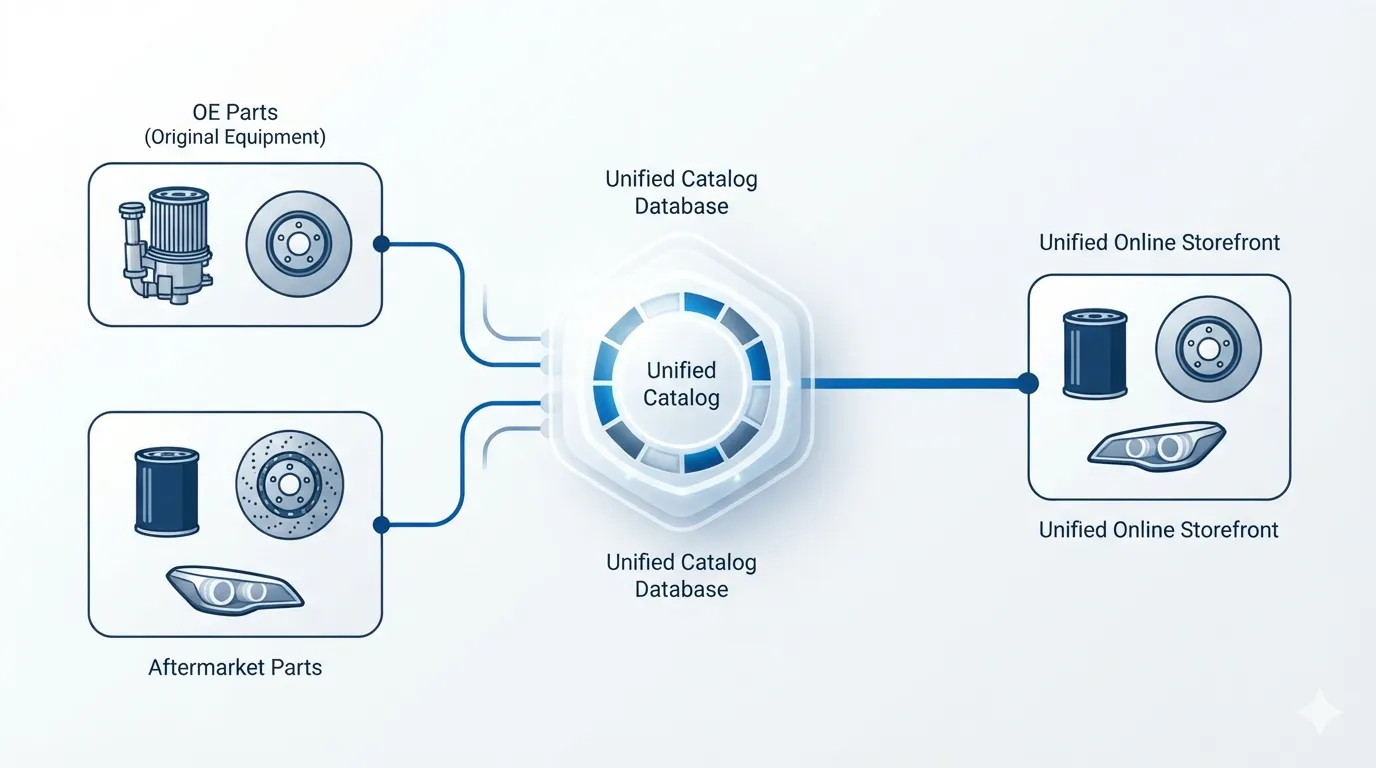
An online auto parts store that wants to cover all customer demand needs, in practice, two data sources, not just one. YQ Service covers OE (Original Equipment) parts, identified precisely by VIN, while TecDoc covers the aftermarket range, with alternatives from third-party manufacturers. A complete auto parts catalog doesn't choose between the two systems — it combines them, so the customer finds both the original part and its aftermarket equivalent in the same place.
The real question for a store isn't "YQ Service or TecDoc?", but "how do I bring data from both into a single catalog, without duplication or customer confusion?". The answer depends on the store's architecture, how the product catalog is structured, and the display rules for equivalent parts.
This article explains the role of each system, how OE and aftermarket data connect for the same vehicle, which technical problems appear when combining them, and how this approach was implemented in stoauto.ro, an original auto parts store built by HappyWeb with YQ Service integration.
What role does YQ Service play in a complete catalog
YQ Service is an automotive component information system (ACIS) that identifies original parts starting from a vehicle's VIN (Vehicle Identification Number). In practice, the store enters or captures the customer's VIN, and the system returns the exact OE parts that fit, along with graphic diagrams showing their physical location on the vehicle.
According to information published by YQ Service, the platform covers over 100 million VINs and 67 passenger and commercial vehicle brands, using original data sourced from manufacturers. The company is a member of the Automotive Data Publishers Association (ADPA) and recently joined CARMUNICATION, an association promoting fair access to vehicle data.
For an online store, this means a level of precision that a classic brand/model/year search can't always deliver, especially for vehicles with multiple engine variants or facelifts that change part compatibility.
What role does TecDoc play in the same catalog
TecDoc, developed by TecAlliance, is the reference catalog for aftermarket parts — alternatives produced by third-party suppliers to original parts. A store that sells only OE parts limits the customer's options to a single price tier and to the stock of a single type of supplier.
Adding TecDoc to the catalog lets the store display, for the same technical position (for example, an oil filter or a brake pad set), both the original variant identified through YQ Service and the equivalent aftermarket variants from TecDoc, with different prices and brands.
For technical TecDoc integration details (API, licensing, catalog sync architecture), see HappyWeb.ro's dedicated TecDoc guides; this article covers combining the two systems at the catalog level, not the TecDoc implementation itself.
Why OE and aftermarket aren't alternatives, but complements
A common confusion is treating YQ Service and TecDoc as competing solutions, between which a store must choose one. In reality, the two systems answer different needs of the same customer:
- The customer who wants original-part guarantee and confirmed compatibility chooses the OE part.
- The customer on a limited budget or with an older vehicle looks for the equivalent aftermarket option.
- Repair shops frequently need both variants available in parallel, to give the end customer an informed choice.
A store offering only one of the two categories automatically loses the segment of customers looking for the other. A complete catalog, with OE and aftermarket parts shown for the same vehicle, increases conversion chances on every search.
How OE and aftermarket data connect technically for the same vehicle
Linking the two data sets is done, in practice, through the vehicle's common identifier: the VIN for precise model/engine identification, then mapping technical positions (the part's catalog position, not just its name) between the two sources.
- The customer's VIN is entered or captured automatically (if the store offers this field at checkout).
- YQ Service returns the list of compatible OE parts, with graphic diagrams and the original part code.
- The technical position code is used as a reference point to search, in the TecDoc catalog, for aftermarket alternatives for that same position.
- Both variants (OE and aftermarket) are displayed together on the product page, or as alternative options, with price and brand visible for each.
This structure avoids data duplication (the same part described twice, under different names) and reduces the risk of a customer ordering the wrong part because they didn't understand the difference between variants.
Common risks when combining the two catalogs and how to avoid them
Combining two external data sources introduces specific risks, especially if the store doesn't have a catalog structure designed for this from the planning stage.
- Duplicate products: the same part appears twice in the catalog, once from the OE feed and once from the aftermarket feed, with no visible link between them. Avoided with a common mapping key (technical position or OE code) used at import time.
- Customer confusion: the customer doesn't understand the price difference between two seemingly identical products. Avoided with clear labeling ("Original part" vs "Aftermarket part" badges) directly on the product page.
- One catalog becoming outdated: if only one of the feeds is updated regularly (prices, stock), the catalog becomes inconsistent. Avoided with an equal sync/import schedule for both sources.
- Incorrectly mapped compatibility: an aftermarket part displayed as equivalent for a VIN it doesn't actually fit. Avoided by validating mapping on technical position, not generic part name.
Practical plan: adding a complete OE + aftermarket catalog to an existing store
For a store that already has one of the two systems integrated (for example, only TecDoc) and wants to add the other, the practical steps are, broadly, these:
- Stage 1 (0-30 days): audit of the existing catalog, identifying product categories where OE parts bring real value (safety parts, critical engine components) and defining the technical-position mapping structure.
- Stage 2 (30-60 days): YQ Service API integration for VIN-based identification, initial OE data import for prioritized categories, testing the mapping against the existing aftermarket catalog.
- Stage 3 (60-90 days): unified display on the product page (OE + aftermarket), clear visual labeling, real-customer UX testing, and adjusting search filters (brand, model, VIN, part type).
How a customer actually searches in a store with a complete catalog
From the end customer's perspective, the search experience must stay simple, no matter how many data sources sit behind it. In practice, a working flow looks like this:
| Step | What the customer sees | What happens technically |
|---|---|---|
| 1 | Enters the VIN or selects brand/model/year | The request is sent to YQ Service for precise identification |
| 2 | Sees the list of parts available for their vehicle | The system displays the OE parts found, mapped by technical position |
| 3 | Sees, on the same page, aftermarket alternatives too | The TecDoc catalog is queried for the same technical positions |
| 4 | Picks a variant (OE or aftermarket) and adds it to the cart | The chosen product enters the store's standard order flow |
Case study: stoauto.ro, an original parts store with YQ Service integration
stoauto.ro is an online store for original auto parts built by HappyWeb, with direct integration of the yqservice.eu API. The implementation includes a vehicle database (active/inactive depending on parts availability), searchable graphic diagrams of OE parts, VIN-based search, sorting by manufacturer and model, CSV-based price import and updates, and full integration into the store's ecommerce modules (cart, customer account, orders, marketplace feeds).
This project demonstrates, in practice, what implementing YQ Service in a real store means: not just connecting to an API, but integrating its results into the entire sales flow, from search to checkout.
How to decide the weight of each catalog based on the type of store
Not every store needs the same ratio between OE and aftermarket parts. The decision depends on the store's positioning and its customers' expectations:
- A store positioned around original parts (like stoauto.ro) treats YQ Service as the primary source and TecDoc as an extension for categories where customers explicitly ask for cheaper alternatives.
- A generalist store focused on volume and competitive pricing may treat TecDoc as the primary source and YQ Service as a premium option for customers explicitly requesting original parts.
- A B2B store for repair shops typically needs both displayed symmetrically, since the final decision belongs to the mechanic or the shop's own customer.
Frequently asked questions about the complete YQ Service and TecDoc catalog
Can YQ Service and TecDoc be integrated into the same online store?
Yes. The two systems have complementary roles (OE and aftermarket parts, respectively) and can be combined into a single catalog, provided there's a common mapping key (technical position or original code) between the data received from each source.
Does a new store have to integrate both systems from the start?
No. Many stores start with a single system (usually TecDoc, for broad parts coverage) and add YQ Service later, as the categories where original parts bring real value to customers grow.
How do I avoid the same part appearing twice in the catalog?
By mapping parts on technical position, not generic name, so the OE part and its aftermarket equivalents are explicitly linked as alternatives for the same position, instead of being treated as separate, unrelated products.
Does a catalog with both integrations cost more than a single one?
Yes, the development and maintenance effort is higher, since it involves two API integrations, two data sync flows, and an extra mapping layer between them. The exact cost depends on the store's existing architecture and the number of categories covered; for an accurate estimate, talk directly to a specialized development team.
What happens if a vehicle has no data available in YQ Service?
In that case, the store can display the aftermarket alternatives from TecDoc directly, without blocking the customer's search experience. The complete catalog is designed precisely for such situations, so the two sources complement each other.
Conclusion
A complete auto parts catalog doesn't mean choosing between YQ Service and TecDoc — it means combining them: OE parts identified precisely by VIN, completed with aftermarket alternatives for customers looking for different price options. The right technical structure (mapping by technical position, clear labeling, consistent sync of both sources) makes the difference between a coherent catalog and a confusing one for the customer. HappyWeb has already implemented this approach for stoauto.ro, an original parts store with YQ Service integration, and can do the same for a store that wants to combine OE and aftermarket parts in a single place.
Want original and aftermarket parts in the same store? Let's discuss how to combine YQ Service and TecDoc for a complete catalog, tailored to your store's structure.



Write a comment