 English
 Romana

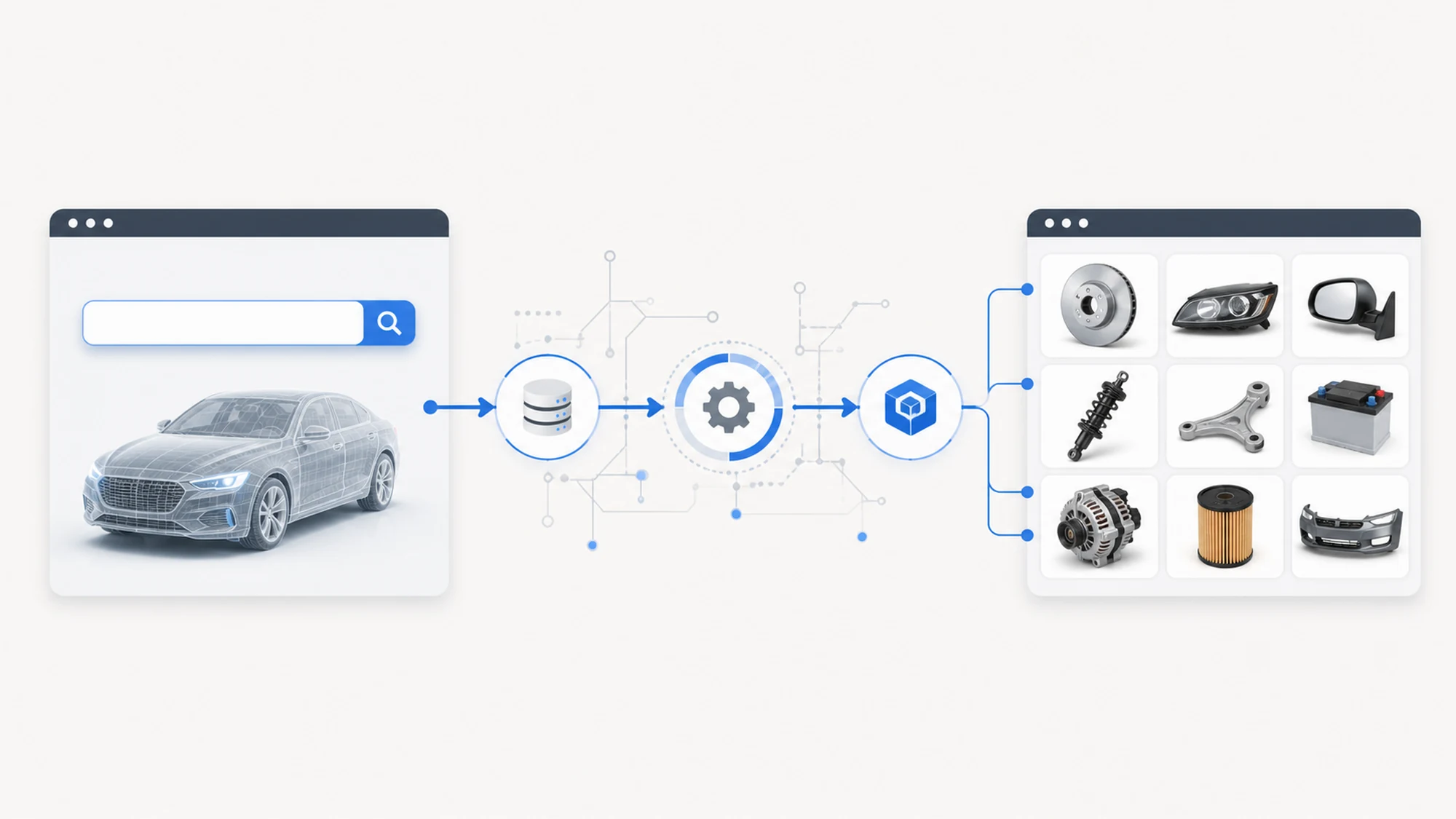
Integrating VIN search with YQ Service comes down to three things: connecting the store to the yqservice.eu API, mapping ACIS data onto your own catalog of original parts, and exposing a search field that confirms the vehicle before showing any parts. The result is a store where a customer enters the car's VIN and sees only the compatible OE parts, not a generic list filtered by make and model.
For a store focused on original parts, this integration solves a concrete problem: the OE catalog is organized by manufacturer part code, not by terms an average customer knows. Without precise VIN-based identification, the risk of wrong orders and returns goes up, and the store's team wastes time manually checking compatibility.
This article is a general technical integration guide, valid for any online store selling original auto parts that is considering this step — not a project narrative. For the concrete implementation example, we have a dedicated case study on VIN search at stoauto.ro, which we return to briefly near the end of this guide.
What Integrating VIN Search with YQ Service Actually Means
YQ Service provides access to the ACIS system (automotive component information system), which links a VIN to the exact production series of a vehicle and to the original parts compatible with that series. Integration is not just adding a search box to a page — it means connecting the store to this database and building a clear flow between entering the VIN and displaying the correct catalog.
In practice, the integration has three components that need to work together: the connection to the yqservice.eu API, the store's own OE catalog (part diagrams, prices, stock) and the public interface through which the customer enters the VIN and gets a result.
How the Technical Connection to the yqservice.eu API Works
The technical flow is linear, but each step needs to be handled explicitly, not assumed:
- The customer enters the VIN in a dedicated field, with format validation before the query is sent.
- The store sends the request to the yqservice.eu API, which identifies the vehicle (make, model, year, engine) based on the VIN.
- The system confirms the identified vehicle before showing any parts, to remove ambiguity between model generations with similar VINs.
- The API returns the list of compatible OE parts for that exact production series, not a generic range of models.
- The store maps the result onto its own catalog (prices, stock, availability) and displays the final list to the customer.
For the UX details of this flow — error messages, visual confirmation of the vehicle, behavior on an unknown VIN — we described them step by step in the case study on VIN search integration at stoauto.ro, so we won't repeat the same level of detail here.
Steps to Integrate VIN Search in an Online OE Parts Store
The actual sequence of work for a new integration looks like this:
- Audit the existing catalog: how it's organized now, what's missing for precise vehicle-based identification.
- Request API access and documentation from yqservice.eu for the relevant OE parts catalog.
- Technically integrate the API into the store, with authentication and query rate limit handling.
- Populate the OE catalog: upload part diagrams, sortable by manufacturer and model.
- Build the VIN search field in the public interface, with validation and visual confirmation of the vehicle.
- Map prices and stock, usually through periodic CSV import, not manual entry.
- Test on real vehicles, across different makes, years and markets, before public launch.
How to Map VIN Results onto Your Own Parts Catalog
The yqservice.eu API returns parts identified by the original manufacturer code. The store needs to link this code to its own product records — price, stock, images, description — so the VIN search result looks like an integrated part of the store, not a separate technical table.
Two decisions matter here: how you handle an OE code that exists in ACIS but not yet in your own catalog (usually, displaying it with an on-request order option) and how you sync prices without depending on manual updates. A scheduled CSV import, verified before publishing, is the approach that works in practice for large OE part catalogs.
When You Only Need YQ Service and When to Add TecDoc
YQ Service covers original (OE) parts; it does not cover aftermarket. If the store sells exclusively original parts, the integration described here is enough. If you sell or plan to sell aftermarket parts too, you need TecDoc as well — the two systems are complementary, not alternatives you choose between.
| Store situation | What you integrate |
|---|---|
| Sells exclusively original (OE) parts | YQ Service, with VIN search as the main entry point |
| Sells exclusively aftermarket parts | TecDoc, without YQ Service |
| Sells both OE and aftermarket (complete catalog) | YQ Service and TecDoc, with a shared VIN search for both catalogs |
| Evaluating expansion from aftermarket to original parts | YQ Service added next to existing TecDoc, without redoing the aftermarket integration |
Common Integration Risks and How to Prevent Them
Most problems appear at the edges of the flow, not in the ideal case — a valid VIN, with complete data, that returns exactly the expected parts.
| Risk | How to prevent it |
|---|---|
| Customer enters an invalid VIN format | Format validation before the query is sent to the API |
| Vehicle without complete data in ACIS | Explicit limitation message, with a manual model-based search option |
| OE code identified but missing from your own catalog | Show it with an on-request order option, instead of an empty result |
| Discrepancy between imported price and previously displayed price | Verify the CSV file before automatic publishing on the site |
| Confusion between model generations with similar VINs | Visual confirmation of the identified vehicle before showing parts |
Practical Implementation Plan, Step by Step
For a store starting this integration from scratch, a realistic plan looks like this:
- Weeks 1-2: audit the existing catalog, request API access from yqservice.eu, define the mapping structure between OE codes and your own products.
- Weeks 3-5: technically integrate the API, populate the OE catalog with part diagrams, build the VIN search field and the vehicle confirmation step.
- Week 6: map prices and stock through CSV import, integrate into existing ecommerce modules (cart, customer account, orders).
- Week 7 onward: test on real vehicles, across different makes and years, gradual launch and monitoring of the first searches and orders.
Timelines vary depending on how clean the existing catalog is and how many parts need mapping, but the order of the stages stays the same regardless of store size.
A Real Example: VIN Search Integration at stoauto.ro
stoauto.ro is the online store for original auto parts where HappyWeb implemented exactly this type of integration: VIN search connected to yqservice.eu, an OE catalog with part diagrams sortable by manufacturer and model, CSV import for prices, and full integration into the store's ecommerce modules (cart, customer account, orders, marketplace feeds).
The full details of this implementation — from audit to launch, with the decisions made at each stage — are described separately in the stoauto.ro case study, to keep this guide focused on the general integration steps, valid for any store considering the same move.
Frequently Asked Questions
How long does a full VIN search integration with YQ Service take?
For a store with an already organized OE catalog, the technical integration takes a few weeks. Timelines increase if existing data is disorganized or if part diagrams for original parts are missing — populating the catalog is usually the most time-consuming stage.
Do I need advanced technical skills to integrate the yqservice.eu API?
The technical integration requires ecommerce development experience and understanding of the ACIS data structure, but it doesn't require changing the store's base platform — the API connects on top of the existing structure, without replacing it.
What happens if a vehicle doesn't have complete data in the ACIS system?
The store explicitly shows the limitation to the customer and offers a manual model-based search alternative, instead of showing an incomplete or incorrect parts list.
Can VIN search be integrated without shutting down the existing store?
Yes. The integration happens in parallel with the live store, and VIN search launches publicly after testing on real data, not before it.
Do I have to choose between YQ Service and TecDoc for integration?
No. They are complementary systems — YQ Service covers original (OE) parts, TecDoc covers aftermarket. A store with a complete catalog uses both, with VIN search as a shared entry point.
Conclusion
Integrating VIN search with YQ Service into an OE parts store comes down to three clear things: a technical connection to the yqservice.eu API, correct mapping of results onto your own catalog, and a simple public flow with visual vehicle confirmation before parts are shown. Followed in this order, the integration directly reduces compatibility errors and time lost on manual checks.
Want VIN search and OE parts in your auto store? Contact us to discuss integration.
Image generated with AI, used for illustrative purposes.



Write a comment